Patron Search Using First Name/Last Name/Player ID
Stay is enhanced to allow users to search and retrieve patron profiles using a patron’s first name, last name, phone number, or patron ID in the Book a Reservation screen when integrated with the following casino management systems:
-
IGT Casino
-
Advanced Casino Systems Corporation (ACSC) via Light & Wonder Envoy
Previously, users could search and retrieve patron profiles using patron ID only.
Book a Reservation Screen
To support this enhancement, the existing Player ID or Card ID field in the Book a Reservation screen has been renamed to Player and the following placeholder text will be displayed in this field: Search for Player ID, Card ID or click advanced search. Users can continue to search for a patron profile using the patron ID in this field.
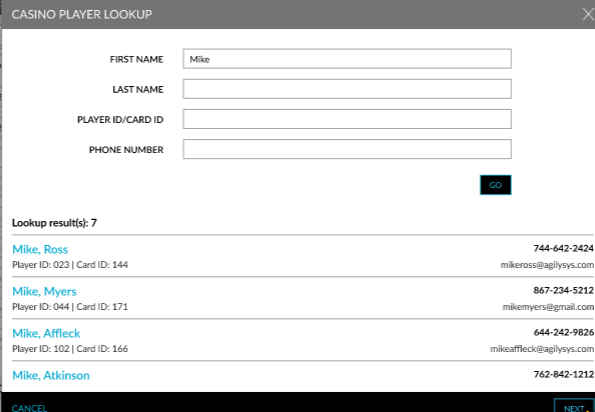
A new option, Advanced Search, has been added below the Player field to enable users to search for casino patron profiles using the patron’s first name, last name, or phone number. When clicked, the Casino Player Lookup pop-up screen appears that allows users to search for a patron profile using the patron’s first name, last name, phone number, or player ID in the First Name, Last Name, Player ID/Card ID and Phone Number fields.
When users click Go, the profiles matching the entered details will be retrieved and displayed in the pop-up screen. Users must select the preferred profile and click Next to continue with the booking.
Book Reservation Screen
When users want to book a reservation by creating a new patron profile in Stay through the Book Reservation screen, users can select the Create profile using casino details radio button. The existing profile creation options, Search for a guest, Create a new profile, and Create profile using casino details have been modified from hyperlinks to radio buttons.
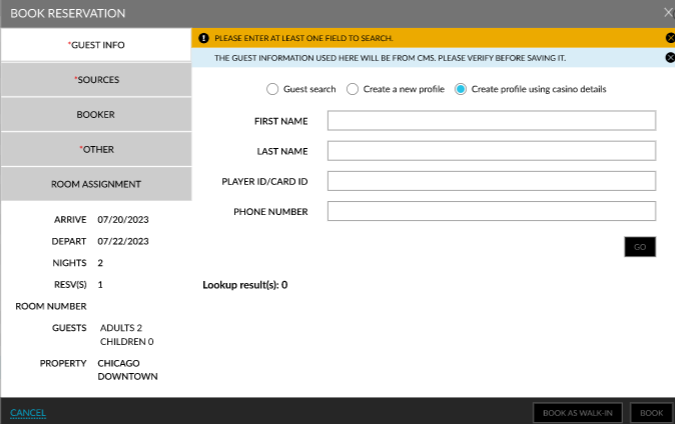
When the Create profile using casino details option is selected, users can search for a casino patron profile using the patron’s first name, last name, phone number, or player ID using the First Name, Last Name, Player ID/Card ID and Phone Number fields.
When users click Go, the profiles matching the entered details are retrieved and displayed. Once the preferred profile is selected, users can proceed to create a new profile with the patron details retrieved from the CMS.
Add Casino Details to Reservations
When users add casino details to reservations (Reservation ➜ Casino Program ➜ Add), users can search and retrieve a casino patron’s details using the patron’s first name, last name, phone number, or player ID in the First Name, Last Name, Player ID/Card ID, and Phone Number fields in the Add Casino Details screen.
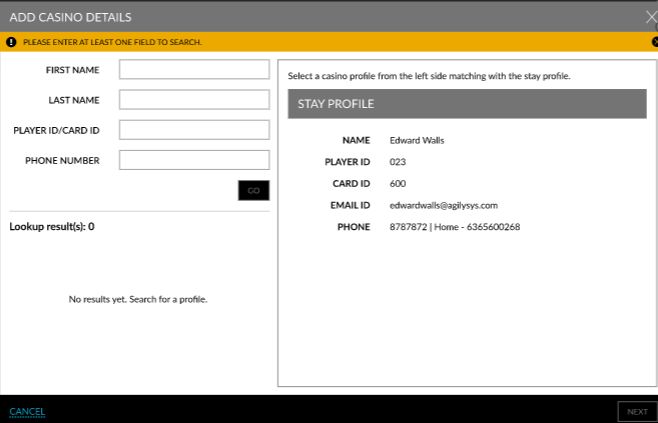
When users click Go, the profiles matching the entered details will be retrieved and displayed. Once the preferred profile is selected, users can proceed to create a new profile with the patron details retrieved from the CMS.
Add Casino Details to Profiles
When users add casino details to guest profiles (Guest Profile ➜ Loyalty ➜ Casino Program ➜ Add), users can search and retrieve a patron’s details using the patron’s first name, last name, phone number, or player ID in the First Name, Last Name, Player ID/Card ID, and Phone Number fields in the Add Casino Details screen.
When users click Go, the profiles matching the entered details are retrieved and displayed. Once the preferred profile is selected, users can proceed to create a new profile with the patron details retrieved from the CMS.
Create New Guest Profile
When users create a new guest profile using the Create profile using casino details hyperlink in the Guest Profile screen, users can search and retrieve a patron’s details using the patron’s first name, last name, phone number, or player ID in the First Name, Last Name, Player ID/Card ID and Phone Number fields in the Create Profile Using Casino Details pop-up screen.
When users click Go, the profiles matching the entered details are retrieved and displayed. Once the preferred profile is selected, users can proceed to create a new profile with the patron details retrieved from the CMS.